


Digital Car Audio Bass Enhancer Driver Equalizer -CVM0
Couldn't load pickup availability
 Secure Checkout
 100% Authentic
 Free Shipping
 Live Support


Overview
Digital Car Audio Bass Enhancer Driver Equalizer
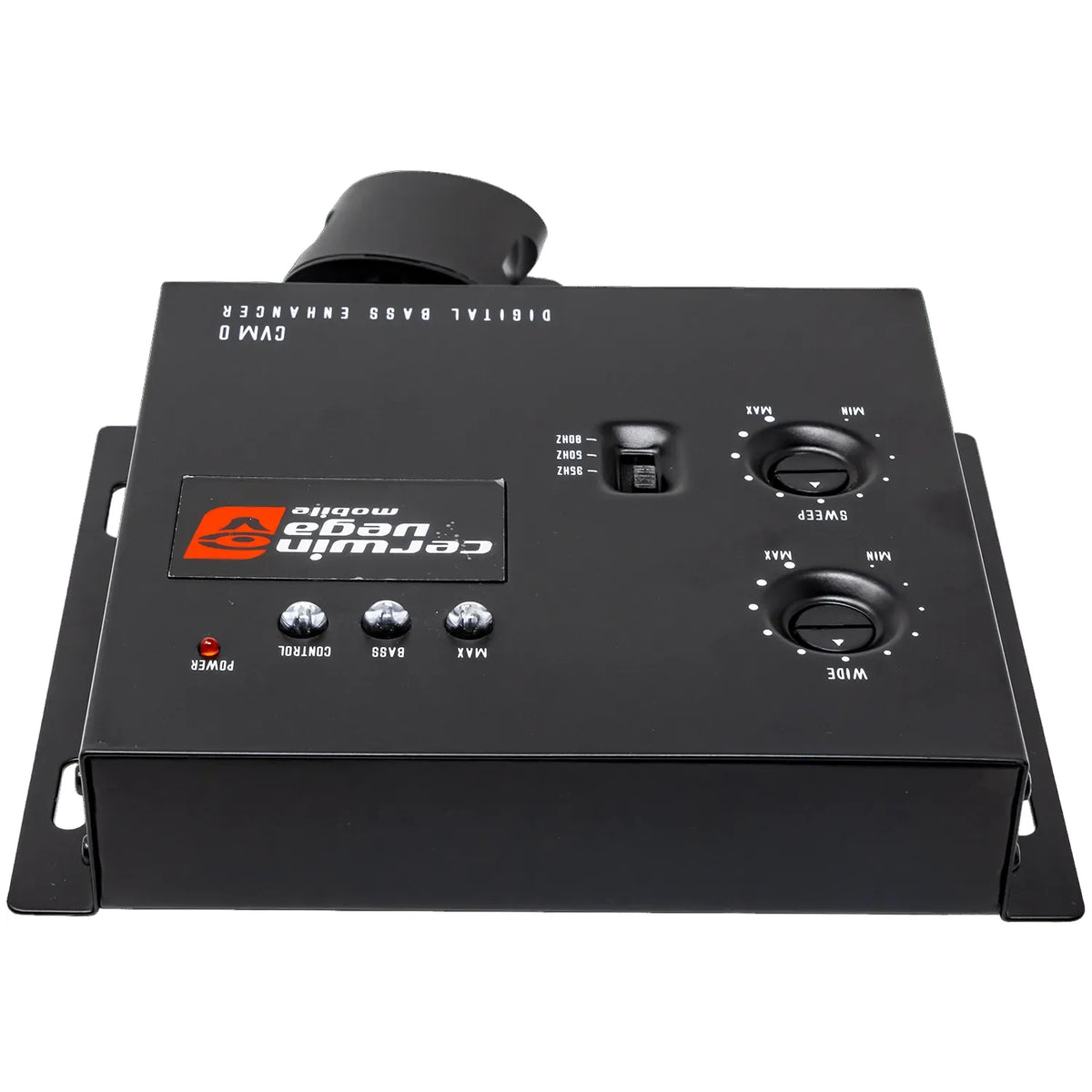
Enhance the power and clarity of your car audio system with the Cerwin-Vega CVM0 Vega Series Digital Car Audio Bass Enhancer Driver Equalizer, a compact yet powerful processor designed to maximize low-frequency performance and overall sound quality. Built for car audio enthusiasts who want deeper bass and improved signal control, the CVM0 Digital Bass Enhancer (DBE) delivers the legendary Cerwin-Vega bass experience with precision and reliability.
The CVM0 bass enhancer processor restores and boosts low-frequency signals that are often lost in compressed audio formats and factory sound systems. Using advanced bass driver and equalization circuitry, this processor enhances sub-bass and mid-bass frequencies, allowing your subwoofers and speakers to produce deeper, richer, and more impactful bass while maintaining clean sound reproduction.
Engineered to integrate seamlessly with modern car audio systems, the CVM0 supports high input and output voltage levels, ensuring compatibility with both factory and aftermarket head units. With a maximum input level of 15V RMS and a peak output level of 13.2V, this processor delivers a strong and clean signal to amplifiers, helping maximize system efficiency and dynamic performance.
The bass equalization circuit allows users to fine-tune the bass response to match their listening preferences and music style. A built-in Bass Maximizer indicator visually displays the level of bass enhancement, making adjustments easy and precise.
For convenient control, the included dash mount remote control allows drivers to adjust bass levels instantly without accessing the main unit. Whether you're listening to hip-hop, rock, EDM, or electronic music, you can easily dial in the perfect bass level for every track.
To protect your speakers and improve sound quality, the CVM0 features a PFM subsonic filter switch, which removes ultra-low frequencies that can cause distortion or damage to subwoofers. This helps maintain tight, controlled bass while extending speaker life.
Key Features:
• Digital bass enhancer driver equalizer for car audio systems
• 15V RMS maximum input level for high-powered signals
• 13.2V peak output for improved amplifier performance
• Advanced bass driver and equalization circuitry
• Dash mount remote bass level control included
• PFM subsonic filter for speaker protection
The Cerwin-Vega CVM0 Bass Enhancer is the perfect solution for anyone looking to unlock deeper bass, improved clarity, and maximum performance from their car audio system.
Specifications
Product Manuals




Elevate Your Sonic Heritage
Since 1954, Cerwin-Vega has defined legendary performance. The CVM Series brings that iconic heritage to your fingertips, delivering professional-grade precision and rugged durability for a truly immersive, high-fidelity experience.

Engineered for Peak Performance
Upgrade your audio setup with the perfect balance of innovation and value. Built with premium components, our CVM gear ensures reliable, crystal-clear output that captures every sonic detail with effortless power.
Crossover, Digital Sound Processors, Signal Converter, Bluetooth Receivers - FAQ
Q1: When do I need a line‑output converter (LOC)? How should I choose between IOEM‑series LOC and compact SLMLOCT series?
A: You need a LOC when your factory head‑unit lacks RCA pre‑amp outputs, and you plan to add external amplifiers. It converts high‑level speaker‑level signals into low‑level RCA signals. IOEM models are active units with ground‑isolation and load‑select switches, ideal for complex installations prone to noise. The compact SLMLOCT series fits tight spaces for basic upgrades. Match channel count to your system: pick 2‑in‑2‑out for two‑channel builds, or 4‑in‑4‑out for multi‑amplifier setups.
Q2: What are the main differences between DSP, analogue EQ equaliser, and LOC? Can they be used together?
A: A LOC only converts signal voltage level without tone adjustment. An analogue graphic EQ lets you manually adjust frequency bands as an analogue pre‑stage. Digital DSP offers crossovers, time‑alignment, phase adjustment and parametric EQ via tuning software. They can be combined properly: the factory signal feeds a LOC, then passes to DSP and onwards to amplifiers. Avoid cascading multiple analogue EQ units, as this will raise the noise floor and degrade sound quality.
Q3: Can BTR‑series Bluetooth receivers work without a factory head‑unit? What vehicles are they suitable for?
A: BTR Bluetooth receivers operate standalone without an OEM radio, outputting RCA audio to amplifiers. They work great for UTVs, jet‑skis, motorcycles and off‑road vehicles with no stock head‑unit. They can also add wireless streaming to existing car‑audio systems. Check model specs; select water‑resistant variants for rough outdoor and wet environments.
Q4: Will the CHGLIRCA ground‑loop isolator definitely fix alternator whine noise?
A: The CHGLIRCA isolator suppresses ground‑loop noise, yet it is not a universal fix. When you hear engine‑speed‑dependent whine, first verify all devices are grounded to bare chassis metal, route RCA cables away from power wires, and set the correct load‑select switches on your LOC. Add the isolator only after proper wiring has been completed. It cannot eliminate noise originating from a contaminated vehicle power supply.
Q5: What installation tips apply to DSP processors? Will a DSP drain my car battery?
A: DSP units require 12V constant power, ground and a REM turn‑on signal. Use ACC‑switched power so the unit sleeps automatically at ignition‑off to prevent battery drain. Mount away from heat and moisture. Physical installation is not complete without tuning: configure crossovers, time‑alignment and EQ with official software. Keep input/output gain moderate to prevent signal clipping. Professional shop tuning is recommended if you are unfamiliar with DSP tuning workflows.